Wifite For Windows Link Patched -

Completely new approach to browsing and listening to music on your phone or tablet.

Restart your PC, enter your BIOS/UEFI menu (usually by pressing F12, F11, or Del), and select the USB drive.

Ensure your hardware drivers are updated for best compatibility with tools. Frequently Asked Questions

This public link is valid for 7 days and shares a thread, including any personal information you added. This link or copies made by others cannot be deleted. If you share with third parties, their policies apply. Can’t copy the link right now. Try again later.

This is the "missing link" for most users. Windows cannot pass its internal Wi-Fi card to a Virtual Machine in "Monitor Mode." You must plug in a compatible USB Wi-Fi adapter (like an Alfa or TP-Link with an Atheros chipset) and "attach" it to the VM.

Since Wifite requires raw access to wireless hardware (Monitor Mode), it cannot run natively as a standard .exe . You must use a Linux-based environment within Windows:

: Exploiting weaknesses in Wi-Fi Protected Setup configurations.

💡 : Do not download "Wifite for Windows" .exe files from unofficial sites; they are often malware. Always use the official Wifite GitHub repository within a Linux environment. AI responses may include mistakes. Learn more
wifite for windows link

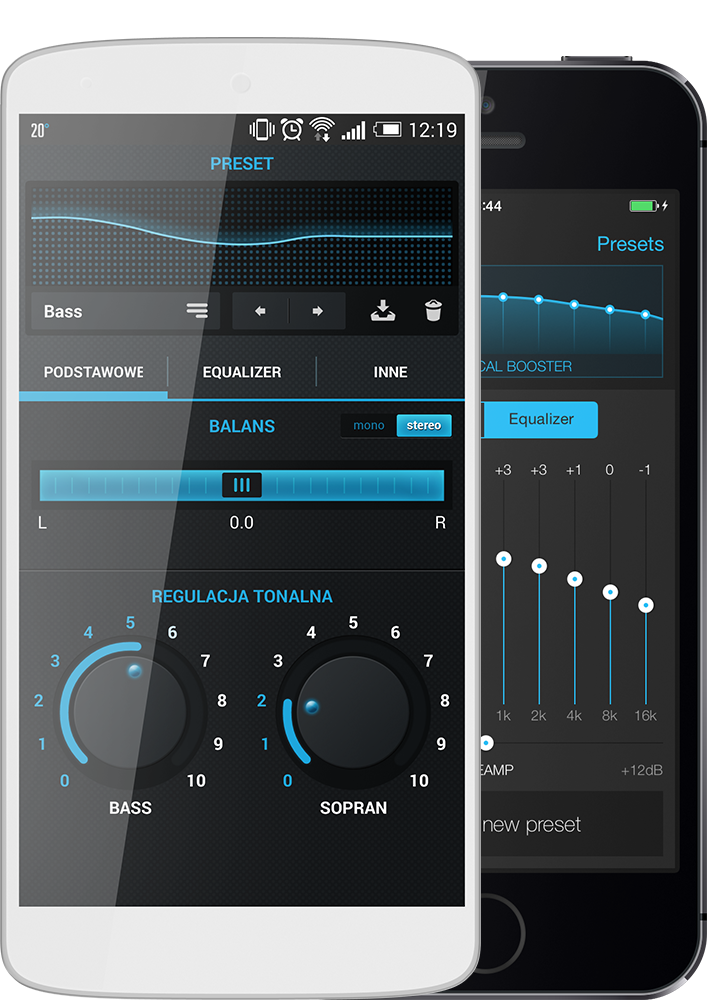
Enrich your sound

Have you ever wanted to make your favourite music sound even better? Now it is possible thanks to various audio equalization modules located in the n7player.

  • 10-band dynamic equalizer with PreAmp.
  • Lots of built-in presets, unlimited number of custom ones.
  • Separate bass and treble controls.
  • Volume normalization, spatial effects and SRS (device-dependent).

Wifite For Windows Link Patched -

Restart your PC, enter your BIOS/UEFI menu (usually by pressing F12, F11, or Del), and select the USB drive.

Ensure your hardware drivers are updated for best compatibility with tools. Frequently Asked Questions

This public link is valid for 7 days and shares a thread, including any personal information you added. This link or copies made by others cannot be deleted. If you share with third parties, their policies apply. Can’t copy the link right now. Try again later. wifite for windows link

This is the "missing link" for most users. Windows cannot pass its internal Wi-Fi card to a Virtual Machine in "Monitor Mode." You must plug in a compatible USB Wi-Fi adapter (like an Alfa or TP-Link with an Atheros chipset) and "attach" it to the VM.

Since Wifite requires raw access to wireless hardware (Monitor Mode), it cannot run natively as a standard .exe . You must use a Linux-based environment within Windows:

: Exploiting weaknesses in Wi-Fi Protected Setup configurations. Restart your PC, enter your BIOS/UEFI menu (usually

💡 : Do not download "Wifite for Windows" .exe files from unofficial sites; they are often malware. Always use the official Wifite GitHub repository within a Linux environment. AI responses may include mistakes. Learn more